Automatic Cropping
Automatic Cropping is an optional setting which can remove extra transparency or white from your imported images. Currently, Automatic Cropping is available only within the Gang Sheet Builder.
To access this option within the Gang Sheet Builder, access the gang sheet settings using the gear icon in the top right corner of the builder. Once opened, scroll down to Crop Settings.
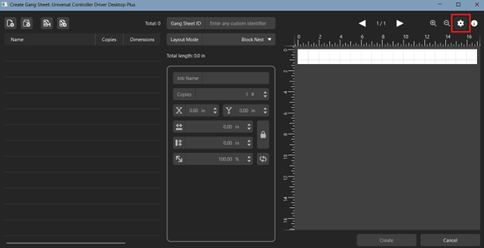

From here, auto crop can be toggled on. Automatic Cropping has additional settings which can be used to adjust the behavior; Crop Threshold, Crop Offset, and Crop White.
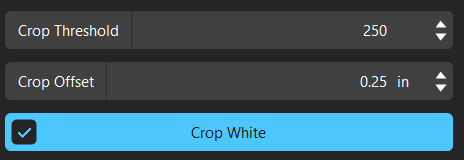
Crop Threshold is used to determine which pixels are transparent, and therefore eligible to be cropped. The Crop Threshold has a range from 255-0. A value of 255 means that only a completely transparent or white pixel is cropped. Reducing the value increases the leeway of the feature, allowing for more aggressive cropping of near-transparent or off-white pixels. The default value of 250 is enough to ensure pixels that visually appear transparent are removed.
Crop Offset provides extra area around the image instead of cropping to the immediate edge. Use this option if any additional space is required around image.
Crop White is used to crop extra white from the image in addition to extra transparency. Crop White uses the same Crop Threshold value to determine what quantifies as “white” for cropping. The default value of 250 is still recommended for most workflows.
Fiery family of software products
Making your machines run better
Copyright © 2026, Fiery LLC. Tutti i diritti riservati. Informativa sulla protezione dei dati personali.


